AI that does the busywork, built around your business.
Not just for your website. Assistants, internal tools and automations built around your data and workflows — so the busywork runs itself. Designed and built by the same Brooklyn studio that builds your site, on your business hours.
Four kinds of AI work, one team.
Each one starts from a job your business already does by hand — and ends with that job done for you.
Custom assistants
Assistants for your customers or your team, grounded in how you work: your services, your policies, your documents. They answer the questions you answer every day, and hand off to a person when they should.
Internal tools
Dashboards and small apps that put AI to work behind the scenes — summarizing intake forms, drafting replies, tagging and sorting records, pulling numbers out of PDFs and email.
Workflow automation
Intake, quotes, reports and follow-ups on autopilot. We connect the tools you already use — forms, email, calendars, spreadsheets, your CRM — and let a model handle the steps in between.
AI-powered products
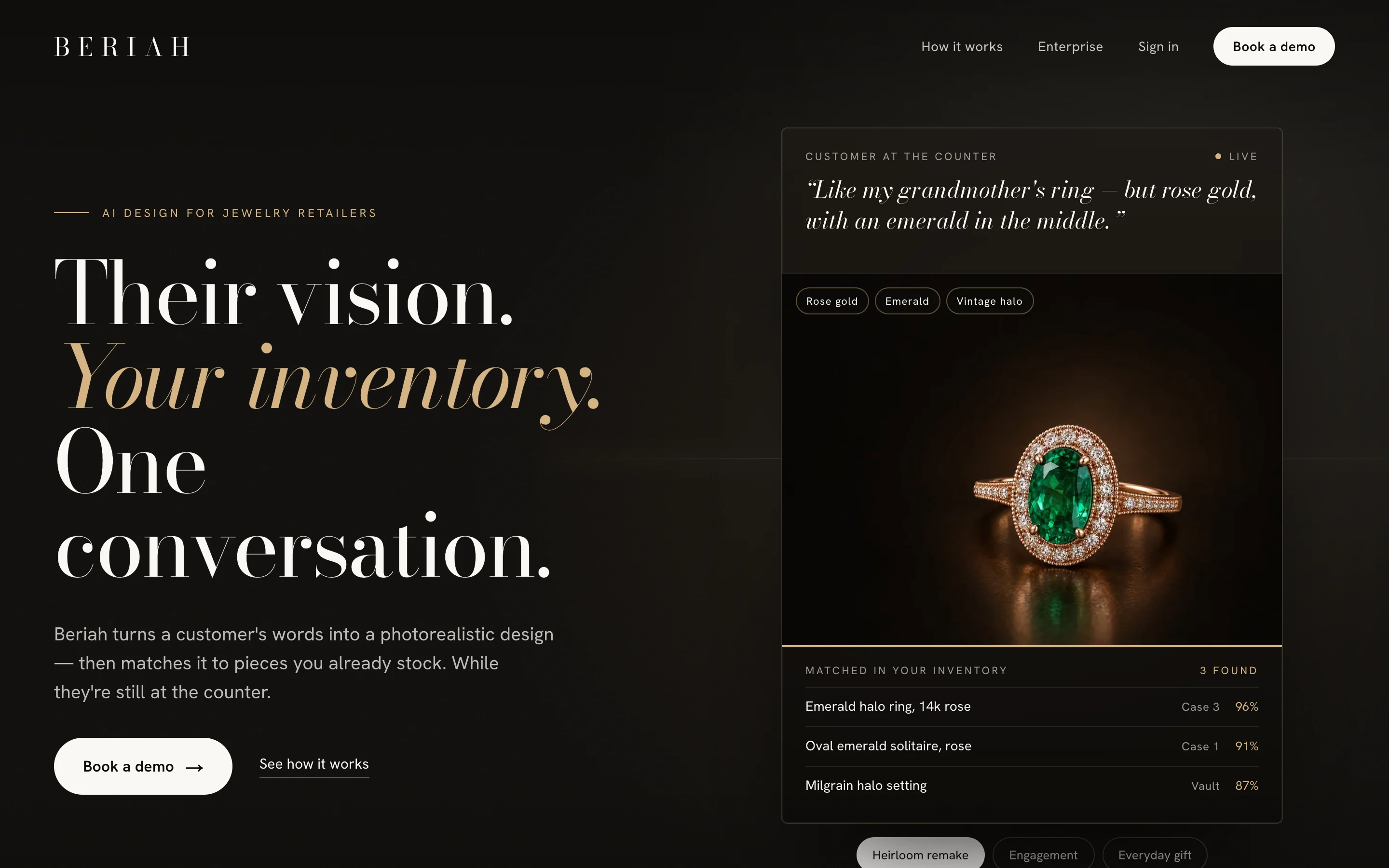
Standalone tools and features your customers pay for: a generator, a recommender, a search that understands what people mean. Beriah, below, is one of these.
Beriah, AI for jewelers.
AI SaaS for jewelers — natural-language prompts become photorealistic renders, then match each design to a store's live inventory via vision embeddings.
Five principles, every AI project.
AI work goes wrong in familiar ways: tools nobody uses, answers nobody checks, costs nobody saw coming. These are the habits that keep ours useful.
Start with the job, not the model
Every engagement begins with a task someone on your team does today. If we can't describe the job in a sentence and check whether it got done, we don't build it yet.
Your data stays in your accounts
Model providers, databases and keys live in accounts you own. You see the usage and the bill directly, and everything stays with you if you ever leave.
A person stays in the loop where it matters
Anything that talks to customers, spends money or changes records gets a review step or a clear handoff to a human. Automation should save time, not create cleanup.
Tested on your real examples
Before launch we test against real examples from your business, so you can see how the tool handles the cases that actually matter to you.
Built like the rest of your stack
Production code held to the same standard as our web builds: typed, documented, and deployed to infrastructure you own, so the next developer can pick it up.
Built to be used, not demoed.
Every AI engagement ships with the pieces that keep a tool working after launch day — not just the part that looks good in a meeting.
- A 45-minute discovery call (free, no deck, no pressure)
- A working prototype on a sample of your real data before the full build
- Production build, deployed to accounts you own
- Testing against real examples from your business before launch
- Usage and costs visible in your own provider accounts
- Documentation and a walkthrough for your team
- Two weeks of launch support — any bug, any prompt tweak, no extra invoice
- Full ownership of the code, prompts and data — no licensing traps
Honest disqualification.
Not every problem needs AI, and not every AI project is one we should take. These are the ones we pass on.
Training a model from scratch. We build on established models and your data — we're not a research lab.
A chatbot with no clear job. If nobody can say what question it should answer or what task it should finish, it won't earn its keep.
Replacing people's judgment on high-stakes calls — medical, legal, or financial decisions. We'll build tools that help your team decide, not ones that decide for them.
No-budget work. Free projects are the ones that get rushed, underscoped, and abandoned. We'd rather decline than half-deliver.
Quoted per project, and what shapes it.
AI work is scoped after the discovery call, because the right build depends on your data and your workflow. Model usage runs on your own accounts, so you pay the provider directly and see every dollar.
Scope
One assistant answering questions from a handful of documents is a different project from an automation that touches five systems.
Data
Clean, digital data is quick to work with. Scanned PDFs, years of spreadsheets, or data spread across several tools take more preparation.
Integrations
Every system the tool reads from or writes to — CRM, email, calendar, accounting, your website — adds scoping and testing.
Review steps
Customer-facing and money-touching tools need more testing and approval flows than internal helpers.
Usage
Ongoing model costs depend on volume. We estimate them up front, so you know what to expect before anything launches.
AI tools, specifically.
The questions we hear most from businesses deciding whether AI is worth it for them.
What can AI actually do for a small business?
Most of the value is in the repetitive work: answering the same questions, reading and sorting incoming forms and emails, drafting quotes and follow-ups, pulling numbers out of documents, and keeping records in sync. If someone on your team does a task the same way many times a week, it's a candidate.
Which AI models do you use?
We pick the model per job, not per vendor. That usually means a hosted model from a major provider such as OpenAI, Anthropic, or Google for language tasks, and specialized models where they fit — Beriah, for example, pairs an image-generation model with a vision model to match designs to live inventory.
Is our data used to train AI models?
Business API accounts from the major providers don't use your data to train their models by default, and we set everything up on accounts you own. Before anything launches, we walk you through exactly what data goes where.
Can it connect to the tools we already use?
Usually, yes. Most CRMs, email platforms, calendars, spreadsheets, accounting tools, and form builders have APIs we can connect to. If something niche doesn't, we'll tell you on the discovery call.
What happens when the AI gets something wrong?
It will sometimes, so we design for it: review steps on anything customer-facing or high-stakes, clear handoffs to a person, and testing against real examples from your business before launch.
Can you add AI to our existing website or app?
Yes. A lot of AI work lives inside the sites and apps we build — a smarter search, an assistant on the contact page, a quoting tool behind a form. If we built your site, it slots right in; if someone else did, we review the codebase first.
Do you offer ongoing support?
Yes. Month-to-month care retainers cover monitoring, prompt and model updates, small improvements, and keeping usage costs in check. Optional — cancel anytime.
Ready to hand off the busywork?
Tell us which task eats your week. We’ll write back within four business hours with next steps or a discovery-call invite.